The Universal Field Guide to Transceivers (SFP, QSFP, BiDi, and Coding)
In the data center, transceivers are like a bag of Skittles, different colors, different types, and if you pick the wrong one, your link stays dark. Most technicians rely on the color of the pull-lever, but as any Remote Hands engineer knows, that is a recipe for a Sev-1 outage.
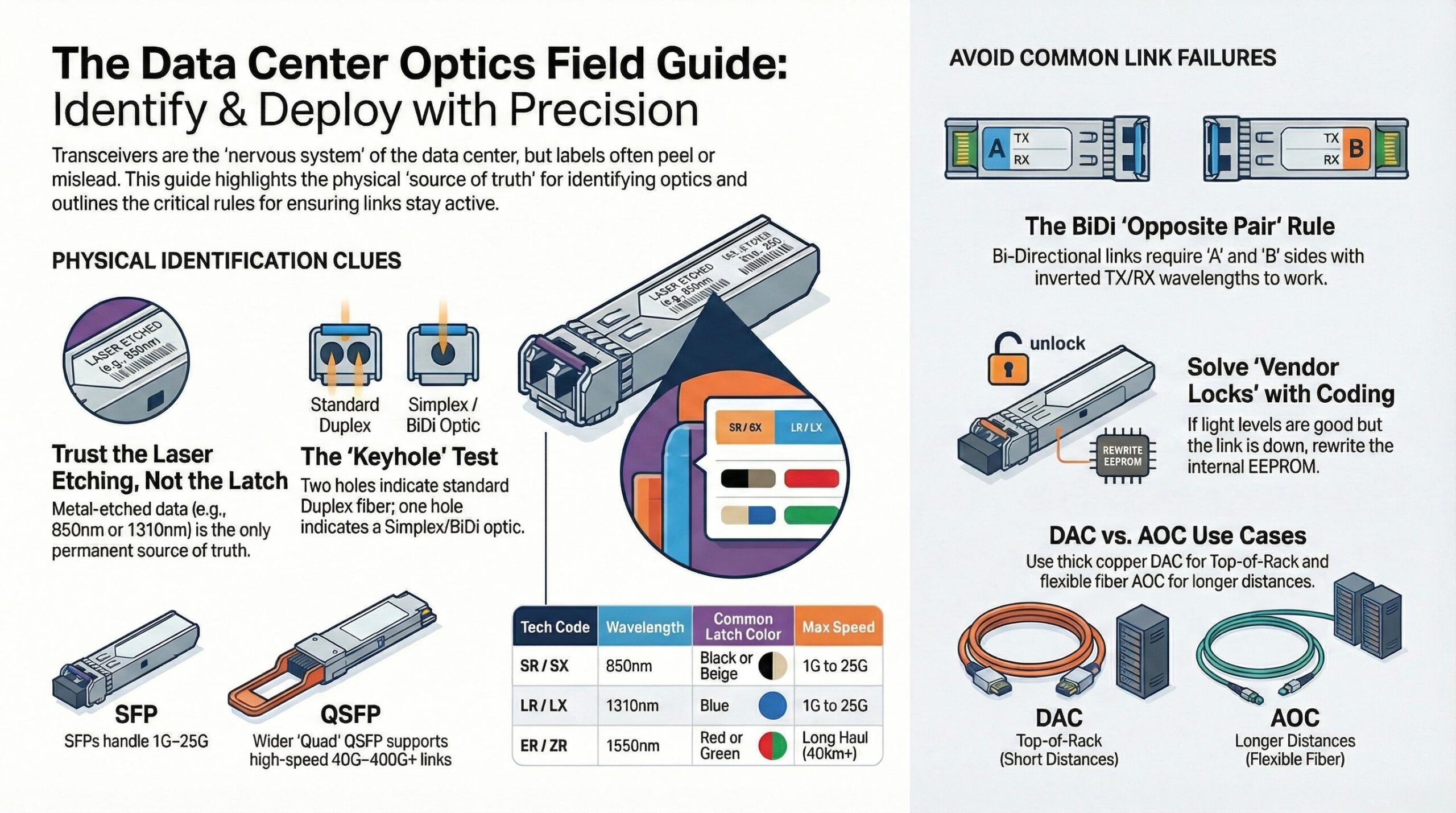
————-Image is for reference only————-
Whether you are looking at a 1G Finisar or a 100G ADVA or Cisco, here is everything you need to know to identify and deploy optics correctly every time.
1. The Hierarchy: SFP vs. QSFP
The first step is identifying the Form Factor. This tells you the physical speed capacity of the port.
- SFP (Small Form-factor Pluggable): The standard “small” plug. Covers 1G (SFP) and 10G (SFP+).
- SFP28: Same size as an SFP+, but designed for 25G. This is the modern standard for high-speed server uplinks.
- QSFP (Quad SFP): Noticeably wider. It uses four lanes of data.
- QSFP+ is 40G.
- QSFP28 is 100G.
- QSFP-DD is 400G+.
2. How to Identify an “Invisible” SFP
Sometimes the label is peeled off or the text is too small to read. When the hardware is “blank,” look for these three clues:
A. The “Keyhole” (The Front Face)
Look at the holes where the fiber plugs in.
- Two Holes (Duplex): Standard. One fiber for Transmit (TX), one for Receive (RX).
- One Hole (Simplex/BiDi): This is a Bi-Directional optic. It sends and receives on the same strand.
B. The Latch Color (The “Usually” Rule)
While not a law, most manufacturers follow these color standards for the pull-lever:
- Black/Beige: Multi-mode (Short range, SX/SR).
- Blue: Single-mode (Long range, LX/LR).
- Red/Green: High-power DWDM or APC connectors.
- Yellow/Purple/Blue (in pairs): These are usually BiDi optics.
The MPO/MTP Connector
Field Note on 100G Connectors: When you move up to QSFP28 (100G SR4), the “two-hole” rule often disappears. Instead of standard LC duplex connectors, many high-speed optics use a single, wide MPO/MTP ribbon connector. If you look inside the port and see a single rectangular plug with 12 tiny fiber pins, you are looking at a parallel optic. Never try to force a standard duplex LC cable into a 100G SR4 port—you’ll ruin the alignment pins.
C. The Laser Etching
Flip the optic over. Almost all SFPs have technical data laser-etched into the metal casing.
- Look for 850nm (Multi-mode) or 1310nm/1550nm (Single-mode).
- If you see “SFP-10G-SR,” you have a 10G Short-Range optic.
3. Solving the “Main Problems”
As we’ve seen in the field, there are three specific things that cause the most confusion:
The BiDi Mystery (The Partner Optic)
I’ve seen many techs try to use two “Blue-lever” BiDis on the same link. It will never work. BiDi optics must be used in Opposite Pairs.
- One side must be TX1310/RX1550.
- The other side must be TX1550/RX1310. If they aren’t “crossed,” they are both shouting into the same lane and listening to nothing.
What is an “SFP Coder”?
You might see a small device in the storage room that looks like a USB card reader. This is a Transceiver Coder. Vendors like Cisco, Juniper, and ADVA often use “Vendor Locks.” If you plug a generic Finisar SFP into a Cisco switch, the port will stay “Admin Down.” The Coder allows us to rewrite the internal EEPROM of the optic. We take a $20 generic SFP, “code” it as a $500 ADVA or Cisco part, and the switch suddenly accepts it. If your light levels are good but the link is down, it’s a coding issue.
The ADVA & Finisar Confusion
Brands like ADVA often use very specific part numbers for their transport equipment. Unlike standard server SFPs, these are often Frequency Specific (DWDM). If a customer asks for a “specific ADVA SFP,” they are likely looking for a specific “Channel” or “Lambda.” You cannot swap these for a generic Cisco SFP because the wavelengths won’t match the multiplexer.
| Code | Wavelength | Cable Color | Speed |
| SR / SX | 850nm | Aqua/Orange | 1G / 10G / 25G |
| LR / LX | 1310nm | Yellow | 1G / 10G / 25G |
| ER / ZR | 1550nm | Yellow | Long Haul (40km+) |
| BiDi | Mixed | Single Strand | Pair dependent |
The “Plug-and-Play” Giants: DAC vs. AOC
Temperature and Reach
The Thermal Trap: Always check the temperature rating etched on the side. If you are working in a high-density AI rack or a non-climate-controlled “Edge” facility, look for “I-Temp” (Industrial Temperature) markings. These are rated for -40°C to 85°C. Using a standard “C-Temp” (Commercial) optic in a hot aisle can lead to “thermal throttling,” where your 10G link stays up but your throughput drops to 1G speeds without warning.
Extended Reach (ER/ZR): While SR (300m) and LR (10km) are the daily standards, you may encounter ER (Extended Reach) and ZR (Zeal Reach). These are designed for “Long Haul” runs of 40km to 80km. Warning: These lasers are extremely powerful. If you plug a ZR optic into a short patch cable without a 10dB attenuator, you can actually “blind” or burn out the receiver on the other side.
If you see a cable with the transceivers already attached (they don’t unplug), you are looking at a “Direct Attach” solution.
DAC (Direct Attach Copper)
- What it is: A “Twinax” copper cable hard-wired into two transceiver heads.
- How to identify: It is thick, heavy, and stiff. Usually black.
- Passive vs. Active DAC: * Passive: No electronics inside. Max reach is ~7 meters.
- Active: Includes a signal booster chip. Can reach ~15 meters.
- Use Case: “Top of Rack” (ToR). Connecting a server to the switch directly above it.
AOC (Active Optical Cable)
- What it is: A fiber optic cable permanently bonded to the transceiver heads.
- How to identify: It is thin, light, and flexible. Usually aqua or orange.
- The Secret: It converts electrical signals to light inside the plug.
- Use Case: “End of Row” or “Middle of Row.” When you need 30m–100m of reach but don’t want the hassle of cleaning fiber connectors.
3. The Copper QSFP Breakdown
Not all “fat” copper cables are the same. In the AI and storage world, we use Breakout Cables.
- QSFP to QSFP: A 1-to-1 40G or 100G link.
- QSFP to 4xSFP+: A “Squid” cable. It takes one 40G port and breaks it into four 10G connections.
- Identification Tip: Check the AWG (American Wire Gauge) on the cable jacket. 24AWG is very thick and used for longer runs; 30AWG is thinner and easier to cable-manage but has a shorter reach.
4. The Branding War: OEM vs. Third-Party (3rd Party)
This is the most confusing part for new techs.
- OEM (Original Equipment Manufacturer): Branded as Cisco, Dell, HP, or Arista. They cost 10x more because the vendor “guarantees” they work.
- 3rd Party (Compatible): Brands like Finisar, Avago, or FS. They are the same hardware but “coded” differently.
- The Coding Mystery: Every SFP has a “Driver’s License” (EEPROM) inside. If a Cisco switch sees an SFP that doesn’t say “Cisco” in its ID, it will put the port in an err-disable state.
Trust the Specs, Not the Color
The world of transceivers is intentionally confusing. Between “Vendor Locks,” different laser wavelengths, and the deceptive colors of pull-levers, it is easy to make a mistake that brings down a production rack.
However, as a professional, your job is to look past the branding. If you remember these three pillars, you will never misidentify an optic again:
- Check the Metal, Not the Plastic: The laser etching on the casing is the only source of truth. If the metal says 1310nm, it’s Single-mode, regardless of whether the latch is blue, black, or red.
- Match Your Pairs: If you’re working with BiDi, ensure you have the “A” and “B” sides. If you’re working with 100G, ensure your cable distance matches the SR4 or LR4 rating of the optic.
- Know the Code: If a link stays dark despite perfect light levels, don’t keep cleaning the fiber. Check the switch logs for “Unsupported Transceiver” errors and get your SFP Coder ready.
At Data Center Desk, we believe that the best engineers are the ones who understand the physical reality of the hardware. Treat every SFP like a critical component of the “Nervous System,” and you’ll keep the Cloud running 24/7/365.