Remote Hands Field Report
The Dell BOSS-S2 Trap: Why Opening the Lid Could Kill Your Boot Sequence Meta Description: Remote Hands alert: Modern Dell PowerEdge M.2 drives (BOSS-S2) are now rear-facing. Learn why pulling the chassis lid for an M.2 reseat is a dangerous mistake.
The Situation: A “Simple” M.2 Reseat
In legacy server architecture, M.2 NVMe or SATA drives were almost exclusively internal. To service them, a technician had to:
- Power down the node.
- Extend the server on its rails.
- Remove the chassis lid.
- Pull the PCIe riser to access the motherboard slots.
However, with the introduction of the Dell BOSS-S2 (Boot Optimized Storage Solution) on 15G and 16G PowerEdge models (like the R650 and R750), this workflow is not only obsolete—it’s a risk to your uptime.
The Field Observation: When Muscle Memory Fails
DataCenterDesk recently tracked an incident where a standard M.2 reseat ticket led to an unexpected “No Boot” scenario. The technician, following legacy procedures, opened the chassis to locate the drives.
The Result: After reassembling the PCIe Gen5 risers and closing the lid, the server failed to initialize.
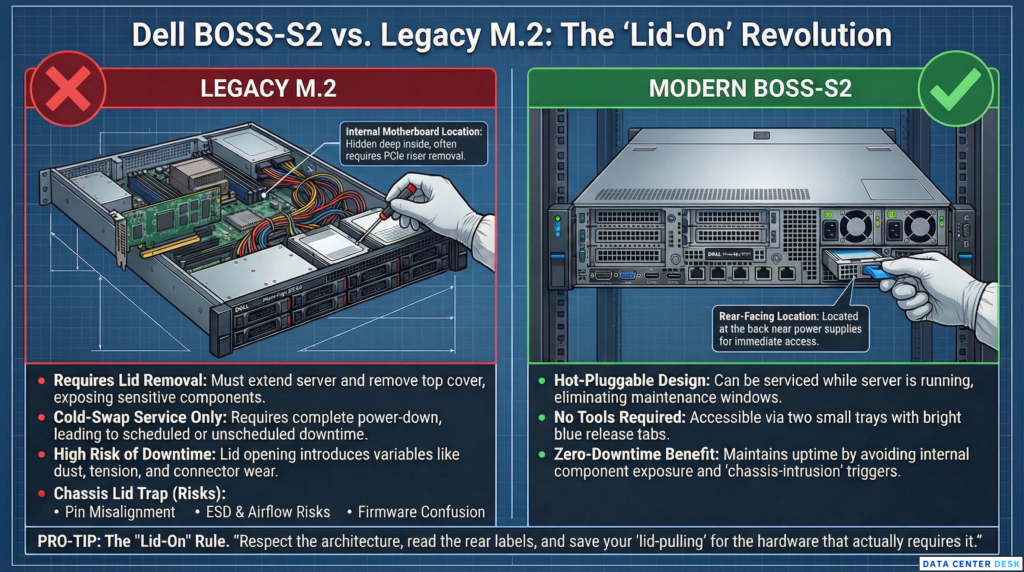
The Analysis: Modern high-density servers have extremely tight tolerances. Reseating internal risers unnecessarily can lead to:
- Pin Misalignment: Slight shifts in the high-speed PCIe slots.
- Static Discharge (ESD) Risk: Opening the lid in a high-airflow environment.
- Firmware Confusion: Some systems trigger a chassis-intrusion or hardware-change flag that prevents an automatic reboot without manual KVM intervention.
Technical Breakdown: Identifying the BOSS-S2 Module
Before you touch the rack, identify your hardware. The BOSS-S2 is designed to be Rear-Facing and Hot-Pluggable.
| Feature | Legacy M.2 (Internal) | Modern BOSS-S2 (External) |
| Location | Motherboard / Riser | Rear Chassis (Near PSUs) |
| Access | Lid Removal Required | Pull-tab / Tray |
| Serviceability | Cold-Swap Only | Hot-Pluggable |
| Visual ID | Hidden | Two small trays with Blue Tabs |
————-Image is for reference only————-
The DataCenterDesk Checklist: “Look Before You Lift”
To avoid turning a 5-minute task into a 2-hour KVM troubleshooting session, follow this protocol:
- Check the Rear I/O: Before extending the server, look at the back. Are there two small horizontal or vertical trays with blue release latches? That is your boot media.
- Verify the Ticket Specs: If the BOM (Bill of Materials) mentions “BOSS-S2,” do not remove the server from the rack.
- The “Lid-On” Rule: If the M.2 is accessible via the rear, keep the lid on. Every time you open a chassis, you introduce variables—dust, cable tension, and connector wear—that can cause a secondary failure.
Touch as little as possible to achieve the result. Modern Dell engineering has moved the M.2 to the back for a reason. Respect the architecture, read the rear labels, and save your “lid-pulling” for the hardware that actually requires it.