Don’t Let a Vendor Kill Your Uptime: The Art of the MOP Review
Look, we’ve all been there. It’s 11 PM, and some vendor rolls into the loading dock with a “Method of Procedure” (MOP) that’s basically 40 pages of fluff they copied and pasted from a manual five years ago. They just want to swap the hardware, get their sign-off, and go home. But if that MOP is garbage and the floor goes dark, guess who’s getting the call at 3 AM? You.
A MOP review isn’t just about checking boxes, it’s about sniffing out where the vendor is trying to take a shortcut. Here’s how you should look at these things before you let anyone touch a live rack.
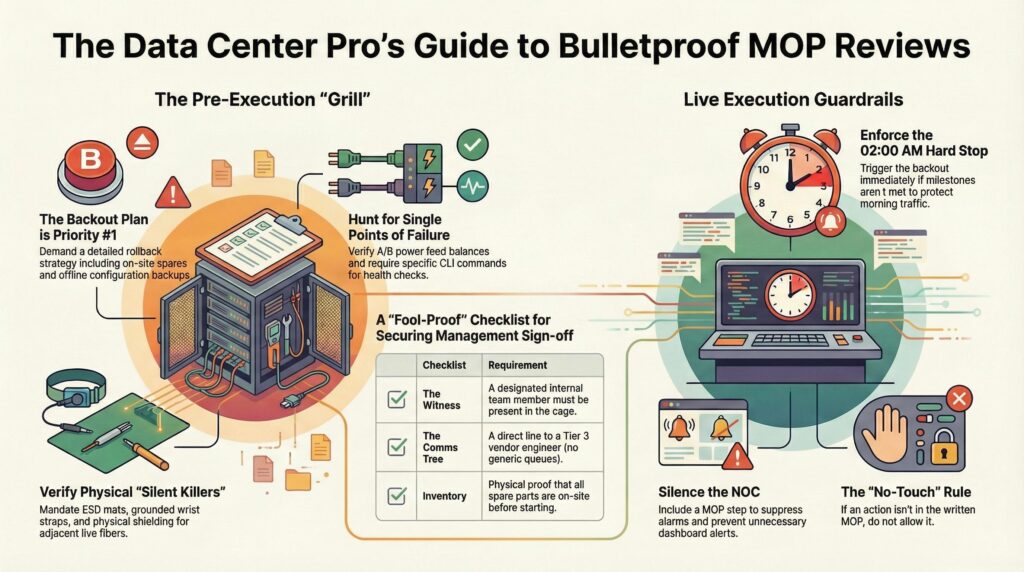
The “Backout Plan” is the only part you actually care about
Most vendors can tell you how they’ll install a new switch in their sleep. That’s the easy part. What I want to see is what they do when everything catches fire. If their “Rollback Plan” is just one sentence that says “Revert to previous state,” you should be sending them back to the drawing board.
You need to know: If the firmware update hangs at 70%, do we have a spare supervisor card right here in the cage? Is the old config sitting on a thumb drive, or is it “somewhere on the cloud” (which we won’t be able to reach if the network is down)? If the exit strategy isn’t as detailed as the install, it’s not a MOP, it’s a prayer.
“While we’re here…” (The Kiss of Death)
This is where the trouble starts. You’re in the middle of the activity, and the vendor says, “Hey, while we’re here, let me just tighten this power cable.” Stop right there. If it’s not in the MOP, don’t touch it. I’ve seen “simple cable adjustments” turn into a Sev-1 outage because someone bumped a neighbor’s SFP. Stick to the document. If it’s not on the paper, it doesn’t exist. Period.
The 02:00 AM Decision Point
You gotta have a “Hard Stop” time. If the maintenance window ends at 05:00 AM, and the vendor is still struggling at 02:00 AM, you need to have a serious talk about pulling the plug.
You should always tell vendors: “If we aren’t at Step 10 by two in the morning, we’re triggering the backout.” It sucks to fail a window, but it sucks way more to have the customer’s CEO calling your boss at 8 AM because the business is offline.
Don’t let the vendor’s ego drive the timeline. They’ll say, ‘Just ten more minutes.’ Ten minutes becomes an hour, and suddenly it’s 4 AM and you’re still in Step 12. If you miss that Hard Stop, you aren’t just failing a window, you’re gambling with the entire morning’s production traffic. Be the ‘bad guy’ and call the rollback.
Why the NOC hates us (and how to fix it)
Don’t be that guy who starts pulling cards without telling the NOC. Your MOP needs to have a specific step for “Call the NOC and tell them to go to sleep.” You want those alarms suppressed. Otherwise, you’re going to have five different people calling you asking why the rack is “bleeding red” on their dashboard while you’re trying to concentrate on a delicate fiber swap.
MOP Review Meeting: Before Management Signs Off
When you’re sitting in a MOP review, you aren’t just a spectator. You’re the one who has to go to your manager or the “higher-ups” and say, “Yes, I trust this person not to kill our network.” If you get that wrong, it’s your reputation on the line, not the vendor’s.
To get that management approval, you need a fool-proof document. That only happens if you build a culture of asking questions to the vendors
The “Single Point of Failure” Hunt
You should look for where the vendor is relying on “luck.” Ask them: “You’re swapping this power supply, but are we 100% sure the A and B feeds are balanced? If the B-side PDU is already at 80% load, and we pull the A-side, will we trip the breaker?” If the vendor hasn’t checked the PDU loads before writing the MOP, the MOP is incomplete. You need to see actual load numbers in the document.
Physical Logistics (The “Silent” Killers)
Management usually cares about the logical network, but you should care about the floor.
- Tooling: Does the MOP list the exact tools? If they need a torque wrench for a busbar and they show up with a standard screwdriver, the work stops.
- PPE: Are they bringing their own anti-static mats and wrist straps?
- The “Bump” Factor: If they are working in a tight rack, how are they protecting the fiber jumpers next to the gear? You should ask: “What is your plan to shield the existing live fiber during the swap?” If they don’t have a plan for physical protection, they haven’t thought it through.
Don’t care if they have a CCIE or twenty years of experience. Look at their hands. If they aren’t wearing a grounded wrist strap or using an ESD mat for a Cisco Nexus or Arista 7000 series card, stop them cold. We have seen ‘Senior’ techs try to slide a line card onto a cardboard box ‘just for a second.’ That ‘second’ is how you end up with a silent failure three weeks later that nobody can explain. Enforce the basics.
Creating a “Culture of Inquiry”
Vendors hate being questioned because it slows them down. Too bad. Don’t let them gloss over a step. If Step 4 says “Verify system health,” stop them right there. Ask: “Verify how? Which command? Show me the exact output we should see.” If it’s not a specific command like show chassis environment, then it’s just a “feeling,” and you can’t get management approval based on a feeling.
The “Pre-Sign Off” Checklist for Management
Before you send that email to your boss for the green light, make sure these three things are locked in:
- The Witness: Who from our team is watching the vendor? You can’t leave them alone in the cage.
- The Communication Tree: If something breaks at 2 AM, who is the exact person we call at the vendor’s HQ? Not a generic “Support” number, You want a name and a direct line to a Tier 3 engineer.
- The Inventory Check: Make the vendor prove the spare parts are actually in the building before the window starts. I’ve seen MOPs fail because the “spare” was still sitting in a DHL warehouse.
Securing the “Fool-Proof” Approval
When you present this to management, you don’t just say it’s fine. You say: “We’ve reviewed the power loads, verified the spare parts are on-site, and locked in a hard-stop time of 03:00 AM for the rollback. The vendor has confirmed the exact CLI commands for health checks.” That level of detail is what makes a manager feel safe enough to sign the paper.
The DAR: Closing the Loop (and Covering Your Back)
The job isn’t done when the vendor packs their bags. The Daily Activity Report (DAR) is the final piece of the MOP process. If you don’t document the finish, the window never actually “closed” in the eyes of management.
What goes in a rock-solid DAR:
- The “Actual” vs. “Planned” Timeline: If the MOP said the swap would take 2 hours but it took 4, explain why. Was it a stuck screw? A slow firmware boot? Management hates surprises, so give them the context.
- Evidence of Health: Don’t just say “It works.” Attach the logs. Show the show interface description or the green LEDs on the power supply.
- The “Lessons Learned”: This is where you build your reputation. If the vendor’s tool wasn’t great or a certain cable was too short, put it in the report. It makes the next MOP review even faster because you’re building a knowledge base.
A DAR is your ‘Get Out of Jail Free’ card. If the vendor struggled with a specific part of the rack or if the labeling was wrong, document it. If a month from now the hardware fails, your DAR will prove it wasn’t because of your lack of oversight, it was a pre-existing condition or a vendor error.
The “Culture of Asking” is your best tool
At the end of the day, a MOP is just paper. The real security comes from you sitting across from that vendor and not being afraid to look like the “annoying guy.”
Ask about the grounding, ask about the VLANs, and ask about the “what ifs.” When you can go to your management team and show them a MOP that has been grilled, tested, and backed up with a solid DAR, you aren’t just a technician anymore. You’re the reason the data center stayed online while the rest of the world was sleeping.